WSUP AI vs Character AI: Which Character Chat App Fits You?
Compare WSUP AI and Character AI for guest access, character creation, memory, images, voice, and safety controls. See which workflow fits you.
Reviewed August 5, 2026. If your priority is opening a browser and starting a character chat before creating an account, WSUP AI is the clearer fit. If you want a much larger public character ecosystem, user-pinned memories, or two-way voice calls, Character AI has the stronger documented tools.
That is the useful answer to WSUP AI vs Character AI: each product removes a different kind of friction. WSUP AI focuses on guest access, configurable characters, automatic rolling long-term memory, contextual image replies, and optional spoken playback. Character AI focuses on catalog breadth, structured creator fields, explicit memory pins, and live voice interaction. Neither wins every category.
Table of Contents
Quick verdict
Choose WSUP AI when you want to:
open a public character and chat as a guest;
create public or private characters with an explicit Filtered or Unfiltered setting;
request a contextual image without leaving the conversation;
listen to eligible character replies on demand;
test a character or roleplay premise before deciding whether to register.
Choose Character AI when you want to:
browse an established catalog that Character AI says contains hundreds of millions of user-created Characters;
pin up to five messages so important facts remain easy for the system to reference;
use a large free-form Definition field for example dialogue and detailed character guidance;
make two-way Character Calls rather than only playing back a text reply;
use a platform with documented web and mobile account flows.
The important qualifier is “when.” A guest start is not automatically better than an account flow, and a pinned memory does not guarantee perfect long-term recall. Pick the workflow that matches how you actually chat.
Comparison at a glance
| Decision point | WSUP AI | Character AI |
|---|---|---|
| First-chat path | Explicit Continue as guest option in the browser | Official help centers account creation and login as the normal access path |
| Character discovery | Public browser roster with category and tag filters | Very large user-created ecosystem; searchable access is more restricted for teens |
| Creator controls | Name, gender, public/private visibility, Filtered/Unfiltered chat, category, description, optional greeting and background, plus a portrait | Long Description, a free-form Definition field, example dialogue, and character privacy settings |
| Continuity | Persistent character setup, recent verbatim turns, and automatic rolling long-term memory | Five user-pinned messages per chat; official docs warn that older details may still be forgotten |
| Images | Contextual image replies only after the user explicitly asks for a visual | The official sources reviewed for this article do not establish an equivalent in-chat image workflow |
| Voice | On-demand audio for eligible character replies; not a live microphone call | Character Voice and two-way Character Calls, with the call transcript stored as text chat |
| Content controls | Creator chooses Filtered or Unfiltered; Unfiltered is described as allowing mature themes | Input and output controls, different teen/adult experiences, and a stated prohibition on pornographic content |
| Platform | Browser-first public product | Documented web and mobile flows |
This table compares visible product behavior and current first-party documentation. It does not claim access to either company's private model architecture.
Starting a chat and account path
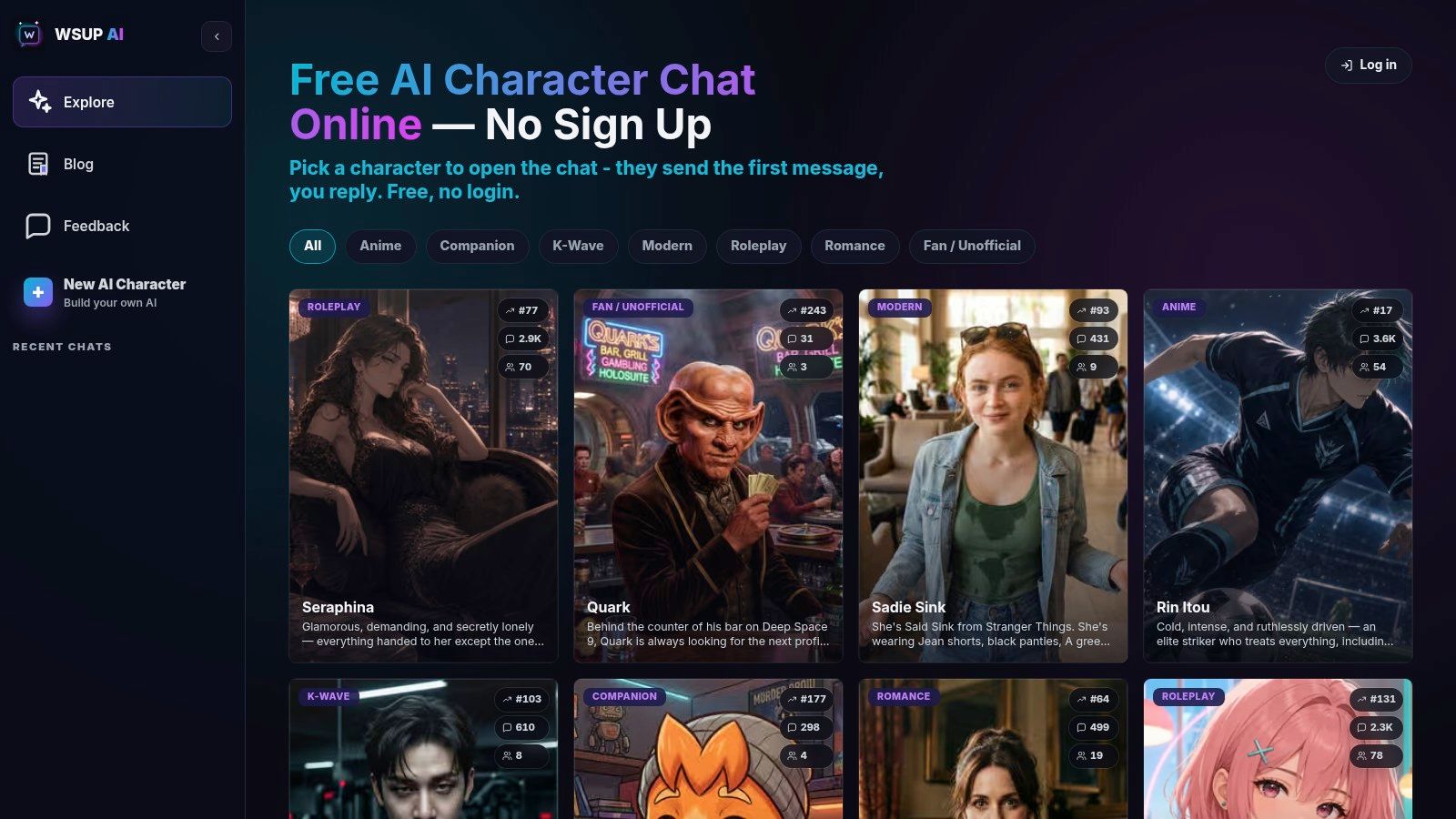
WSUP AI makes the guest path explicit. A visitor can browse the public roster, open a character, and continue without registering. Under the hood, the product uses an anonymous Firebase identity for that session. If the visitor later signs in with email or Google, the anonymous session can be upgraded rather than forcing the conversation to start over.
An account still has practical benefits: saving chat history, keeping created characters, and receiving higher image and audio limits. The point is not that accounts are unnecessary. It is that registration does not gate the first conversation.
Production analytics for the 30 days ending August 5 showed that visitors without an email attached formed a meaningful share of both message senders and people who continued to a second message after configured test and non-regular traffic were excluded. That supports the usefulness of the guest path inside WSUP AI. It is not a Character AI comparison and does not prove that guest access causes better engagement.
Character AI's official help documentation describes account creation and login through email verification, Google, or Apple. Its Safety Center describes completing profile information before exploring Characters. Because login experiments can vary by platform or region, this article does not turn that documentation into the broader claim that every Character AI surface always blocks every guest interaction.
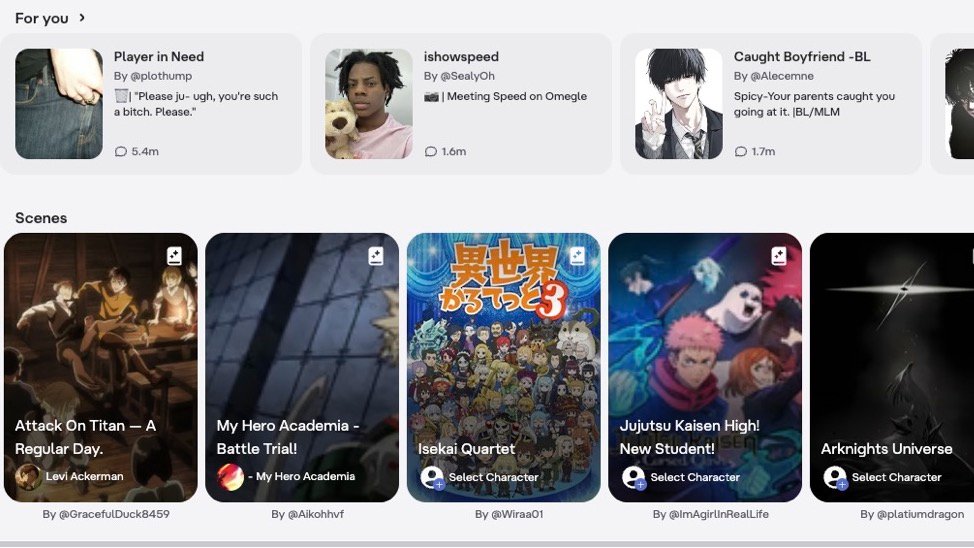
The signed-in Character AI home page organizes discovery into personalized character shelves and larger Scenes cards:
 Edit Alt Text
WSUP AI instead exposes its public character roster and guest route before registration:
 Edit Alt Text
If you mainly want to improve the first few turns, see the practical guide to talking with AI characters. The public character roster is available from the WSUP AI home page linked above.
Creating a character
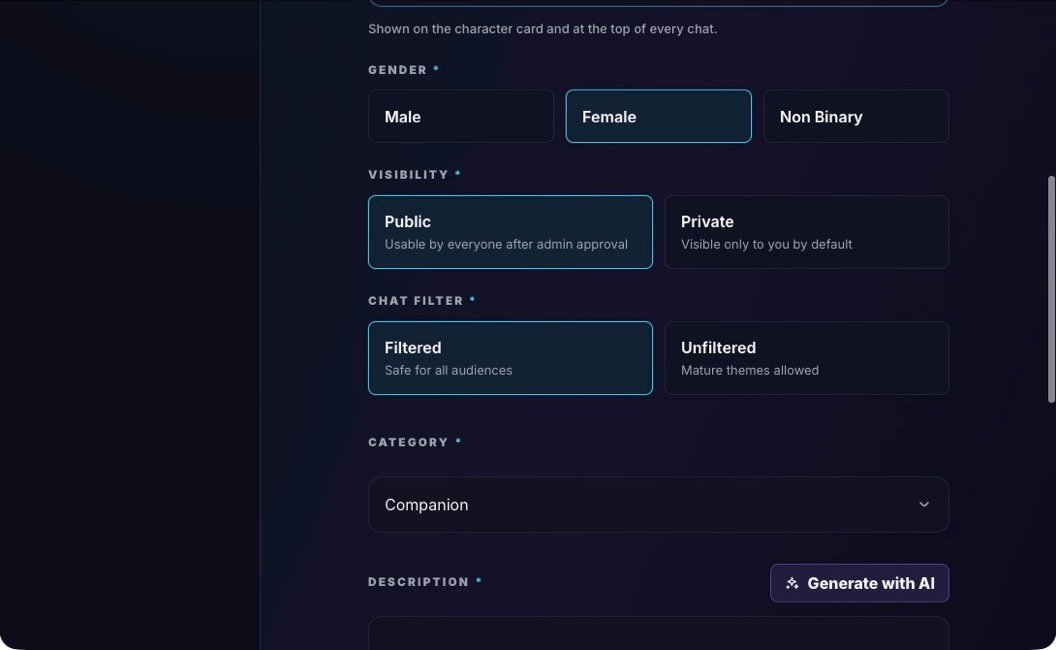
WSUP AI's creator separates the character's identity from the opening scene. You set a name, gender, category, description, and visibility, then optionally add a greeting and background. You also choose Filtered or Unfiltered chat and provide or generate a portrait. Public characters go through approval; private characters remain visible only to their creator by default.
Those fields are intentionally straightforward. The description establishes the visible persona, the optional background supplies deeper context, and the greeting gives the first scene a concrete opening. You can inspect the current fields in the WSUP AI character creator.
The live creator keeps visibility and chat-filter choices explicit:
 Edit Alt Text
Character AI exposes a different creator model. Its official Character Book documents:
a Long Description of up to 500 characters for traits, history, mannerisms, and topics;
a Definition field of up to 32,000 characters for free-form guidance and example dialogue;
variables such as
{{char}}and{{user}}inside example conversations;privacy controls for created Characters.
That gives Character AI creators more room for hand-authored examples. It also adds complexity: the Character Book recommends placing the most important Definition material first because the end may be truncated as a conversation grows.
The practical distinction is not “simple versus advanced.” WSUP AI gives each core roleplay ingredient a separate product field. Character AI gives advanced creators a much larger free-form instruction surface.
Memory and roleplay continuity
WSUP AI combines three continuity layers. The character description, optional background, and shared prompt rules establish the persistent premise. Recent stored user and character turns provide immediate scene context. As older messages move beyond that recent window, WSUP AI automatically compacts them into a bounded rolling summary attached to the active user–character session.
Compaction runs in the background after a successful reply, so it does not delay the visible conversation. The summary is designed to retain useful stable details—such as preferences, relationship changes, promises, roleplay state, and open threads—while newer verbatim messages remain authoritative. It survives page reloads for the same active session; using Reset starts a fresh session and clears that memory. This is rolling summary memory, not embeddings, semantic search, or a permanent user-managed memory catalog.
Character AI documents two relevant continuity tools:
The Definition and Long Description shape the character's persistent setup.
A user can pin up to five messages per chat to emphasize facts that should remain important.
Pinned messages are the clearer manual control. They are useful for a relationship fact, recurring location, or plot rule that you do not want buried. They are not unlimited memory: Character AI's own challenges and limitations documentation says Characters can forget details from earlier in a conversation.
So which memory system is better? Character AI offers the clearer manual control when you want to pin a few specific facts yourself. WSUP AI instead manages longer continuity automatically by combining the stable character premise, recent verbatim turns, and a rolling summary of older conversation. These are different controls rather than proof that either product recalls everything better, and we do not have a controlled long-session benchmark establishing a universal winner.
Images and voice
WSUP AI treats images as a response to conversational intent. A past mention of a room, outfit, or object is not enough to trigger generation by itself. The latest user message must explicitly ask to see something. Recent chat history can then help the generated visual match the current scene.
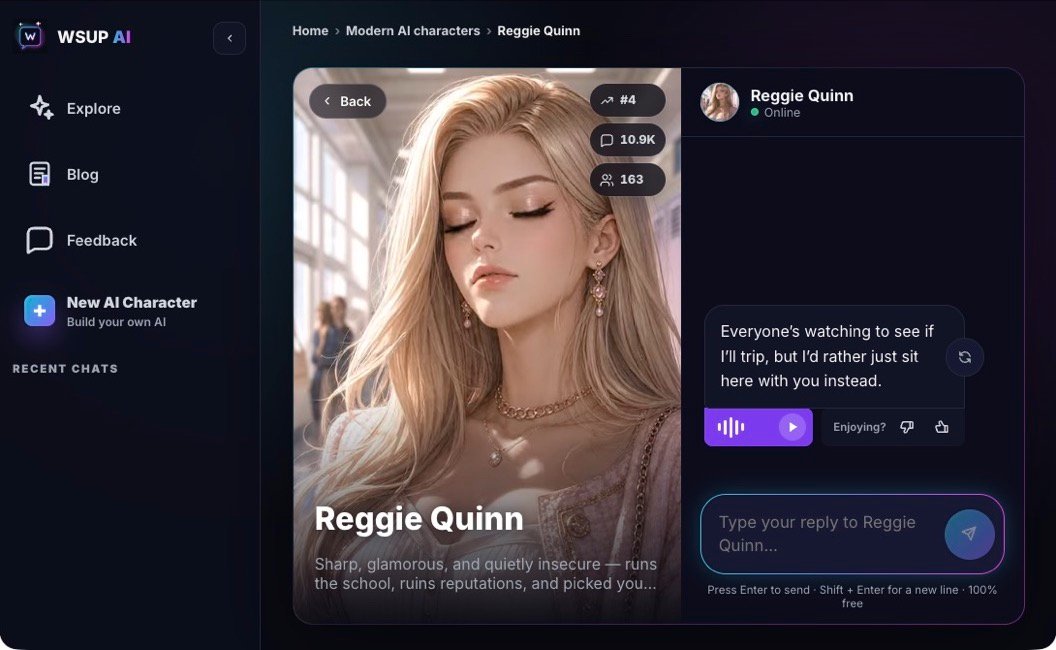
Audio is also optional rather than automatic. When a reply and character are eligible, the user can request spoken playback. WSUP AI does not currently turn that control into an open-microphone, two-way call, and audio is not guaranteed on every message.
In the live chat interface, spoken playback sits beneath an eligible reply alongside regenerate and feedback controls:
 Edit Alt Text
Character AI's official Character Voice FAQ documents a more call-oriented workflow. Character Calls support two-way voice interaction, and the conversation is saved as a text transcript. Character Voice can also be assigned to Characters.
This creates a clean decision:
Choose WSUP AI if contextual visuals and optional spoken replies inside text roleplay matter more.
Choose Character AI if a live voice call is the feature you actually want.
For a more detailed distinction between calls, voice input, and generated reply audio, read AI chat with voice.
Safety and content controls
WSUP AI's creator exposes the choice directly: Filtered is described as safe for all audiences, while Unfiltered allows mature themes. That setting affects character chat behavior, but “Unfiltered” does not mean there are no platform rules, no moderation, or no legal boundaries. Public characters still require approval.
Character AI describes a different system. Its Safety Center says it applies controls to user inputs and model outputs, uses a more conservative model and classifiers for users under 18, and narrows the searchable character set for teens. Its official NSFW guidance says pornographic content is not supported.
Avoid reducing that comparison to “freedom versus censorship.” The products expose different control models and make different policy choices. Users should evaluate the exact kind of roleplay they want, their age and region, and the current rules on each service.
The same precision matters for privacy. Guest access does not by itself mean encrypted, anonymous to the operator, unlogged, or automatically deleted. Account-required access does not prove the opposite. Review retention and data-use policies independently; the private AI chat guide explains the questions worth asking.
Which app should you choose?
WSUP AI is the stronger fit for someone who wants to open a public character immediately, maintain longer roleplay continuity through automatic rolling memory, create a private or public persona with explicit chat-filter controls, request contextual images, and optionally hear eligible replies without turning the session into a live call.
Character AI is the stronger fit for someone who values catalog breadth, wants to pin specific memories, enjoys detailed example-dialogue authoring, or prefers two-way Character Calls.
Try both if your priority is conversation quality rather than a specific feature. Use the same character premise and a short prompt set, then compare:
how quickly the character establishes the scene;
whether it follows a correction on the next turn;
how it handles an important fact several turns later;
whether its safety behavior matches your use case;
whether the media workflow helps or interrupts the roleplay.
That small test is more useful than treating library size, a single reply, or a marketing feature list as proof of overall quality. For more options beyond this head-to-head comparison, see the current Character AI alternatives.
Methodology and FAQ
This comparison was reviewed on August 5, 2026. WSUP AI claims were checked against the current product implementation and documentation. Character AI claims were limited to its current Help Center, Safety Center, and Character Book. We did not rely on private competitor architecture, fabricated user stories, pricing claims, or head-to-head performance benchmarks.
Can I use WSUP AI without signing up?
Yes. The current browser product exposes a Continue as guest path. Signing in later is still useful for retaining access, keeping created characters, and receiving higher media limits.
Which app has better memory?
There is no evidence for a universal winner. Character AI gives users direct control by letting them pin up to five messages. WSUP AI automatically combines persistent character configuration, recent verbatim turns, and a rolling summary of older conversation, but it does not currently expose user-managed pins.
Which app is better for voice chat?
Character AI is the better documented fit for live two-way voice calls. WSUP AI provides on-demand spoken playback for eligible text replies, which suits users who want to remain in a text-led roleplay.
Can I make private characters?
Yes on both products. WSUP AI offers public or private visibility in its creator. Character AI's official help documentation also describes privacy settings for created Characters.