How to Create an AI Character That Actually Stays in Character
Most AI characters fall apart after a few turns. Here's how to create an AI character that keeps its voice, and build one on WSUP AI.

Most AI characters hold up for about three messages. Then the hardened mercenary starts being helpful, the rival who couldn't stand you turns supportive, and you realize you're talking to a chatbot wearing a name tag.
That collapse is the problem worth solving. Not "what is an AI chat generator" — you already know. The real question is how to create an AI character who still sounds like the same person on turn thirty.
Here's what moves the needle, and how to build one on WSUP AI in about two minutes.
Table of Contents
What creating an AI character actually means
Search for an AI chat generator and you'll land on three different products wearing similar names: a general assistant, a character chat app, or a tool that fakes screenshots of text conversations.
This is about the middle one.
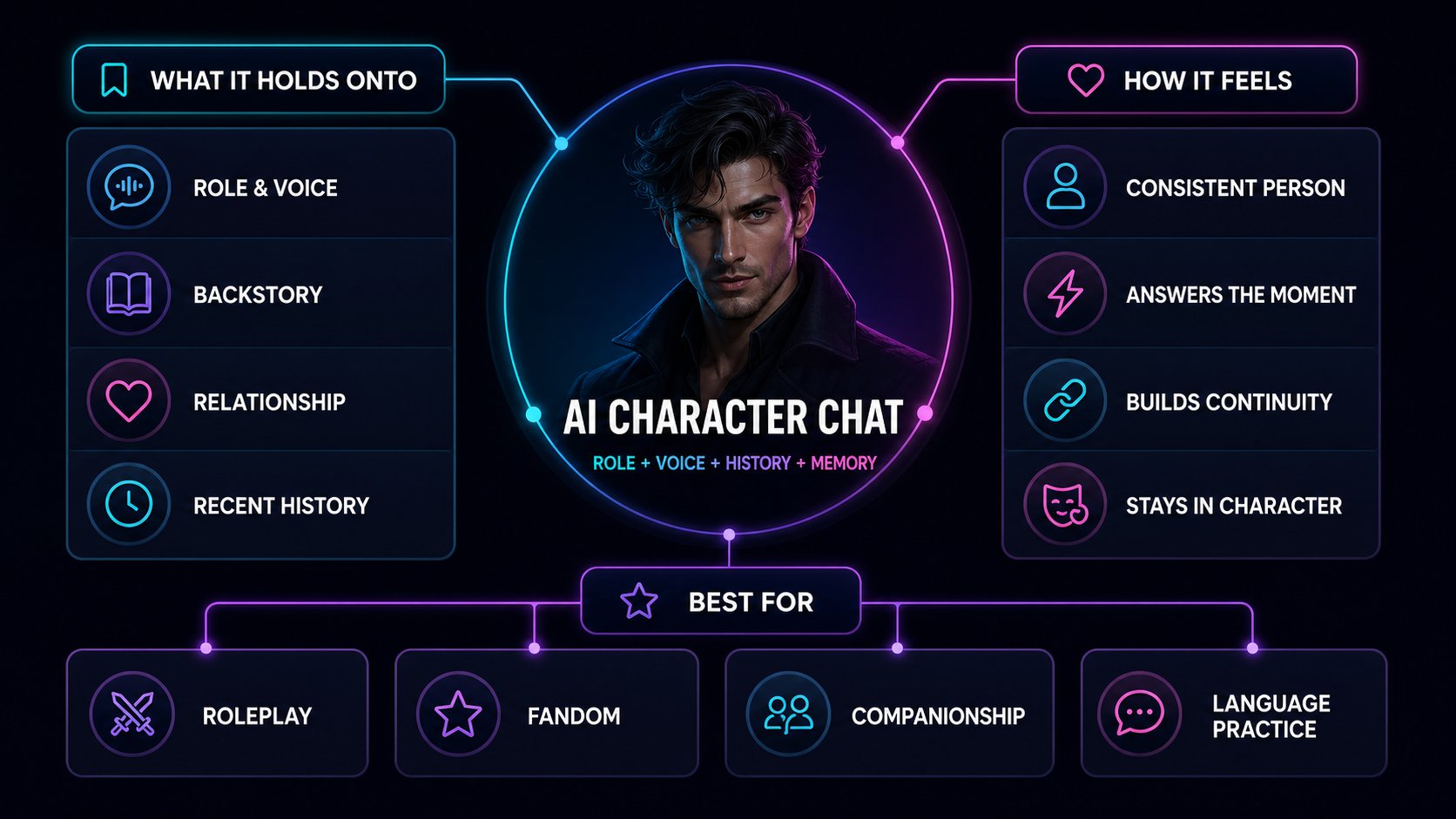
The difference isn't the model. It's what the model is holding onto. An assistant answers your question and forgets you. A character carries a role, a voice, a history with you, and a memory of what just happened. You're not really writing a prompt — you're casting someone and giving them a reason to be in the room.
Rule of thumb: if a reply has to make sense in light of the last twenty messages, you need character chat.
That's what WSUP AI is built for. Character chat in the browser — not support bots, not fake transcripts.
Three products people mix up
Most of the confusion here comes from three genuinely different tools sharing a shelf.
| What it is | You give it | You get back | Memory | Good for |
|---|---|---|---|---|
| General AI chat | A question or a task | An answer | Thin, session-only | Getting things done |
| AI character chat | A persona, a scene, your replies | A reply in character — text, voice, sometimes images | Strong, builds as you go | Roleplay, fandom, companionship |
| Fake chat generators | Names and lines you write yourself | A screenshot that looks like a text thread | Not the point | Memes and mockups |
One question sorts it out: do you want an answer, a character, or a screenshot?
If it's a character, keep reading. If you're comparing platforms first, this overview of Character.AI alternatives covers how different apps handle persona and memory.
How a character reply actually gets made
Nothing mystical happens between your message and the reply. It's the same five steps every time — and knowing them tells you exactly where to intervene when a character starts drifting.
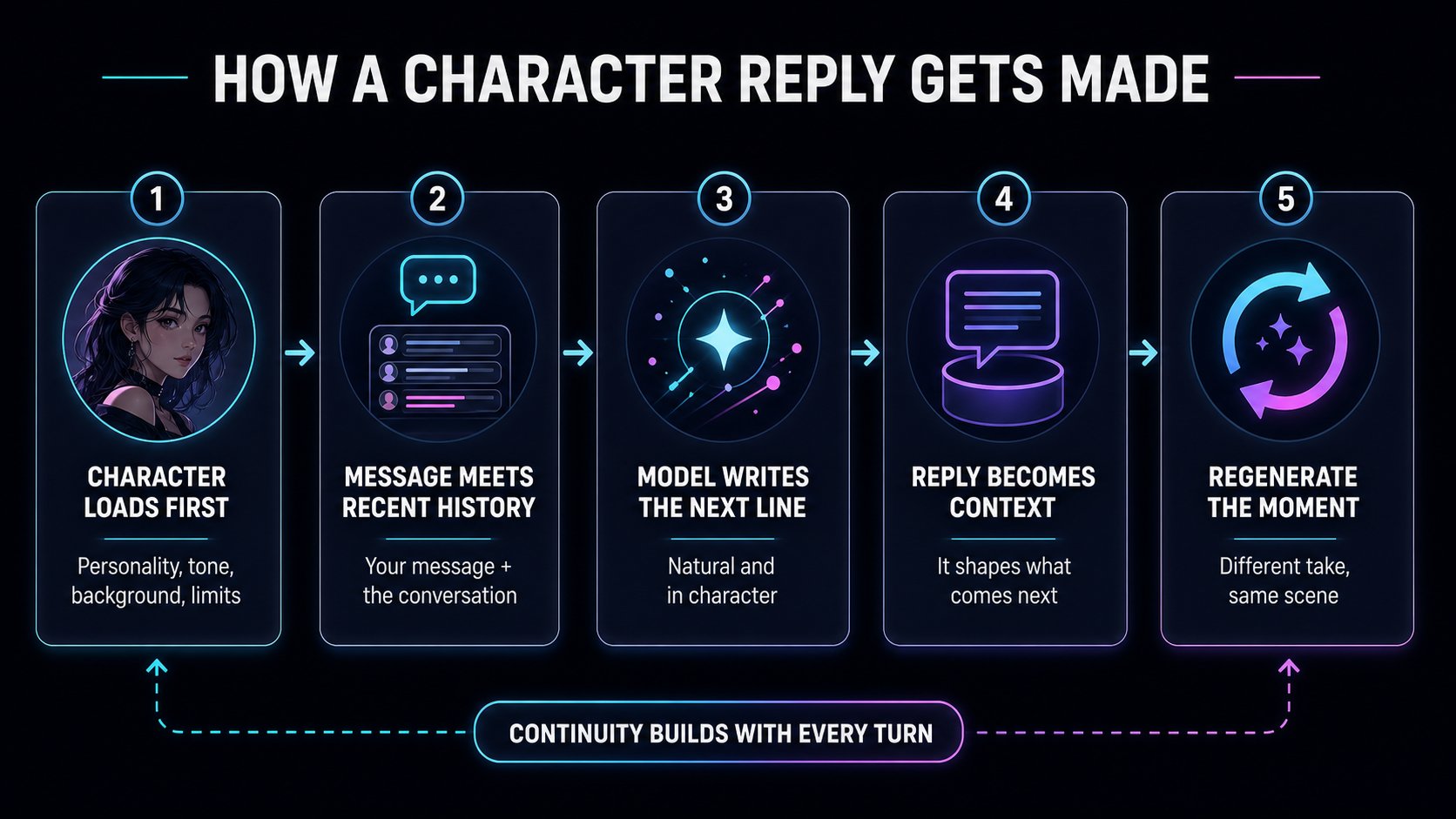
The character loads first
Personality, tone, background, and limits go in before anything else. That's the entire difference between this and a blank assistant.
Your message meets the recent history
What you just typed travels with the recent conversation attached, so the reply answers the moment instead of answering in a vacuum.
The model writes the next line
It's doing two jobs at once: sound natural, and sound like this specific person. When a reply feels off, usually one of those two won.
The reply becomes context
Whatever the character just said is now true. It joins the history and colors everything after it, which is why letting a bad line stand gets expensive fast.
Regenerate rerolls the moment, not the scene
This is the part people underuse. Regenerate asks for a different take on the same beat — the scene, the memory, and everything before it stay exactly where they were. It's a retake, not a reset.
Speed is what makes that usable. A retake you wait five seconds for is a retake you won't bother with. On WSUP AI, replies land in about a second: across roughly 91,000 recent production replies the median was 1.04 seconds, and nine out of ten arrived inside 1.5.
What makes a character feel real
It isn't prose quality. It's consistency.
Consistency beats polish
A beautifully written reply still lands wrong if the role is fuzzy. What sells a character is sameness — the same relationship to you, the same voice, the same reaction to the same kind of pressure.
Twenty coherent turns beat one dazzling one.
Continuity is what keeps people around
You can see it in how people use the thing. Over a recent two-week stretch, 1,299 people sent about 90,000 messages — roughly 70 each — and a typical active session ran a little over fifteen minutes. About 15% came back on a different day. Those aren't one-off-question numbers. That's what happens when a conversation is worth continuing.
When quality drops, it's almost always one of three things: the character has gone generic, the scene has drifted, or the tone has slipped. All three are setup problems, and none of them require starting over.
How to create an AI character on WSUP AI
The easy way in is to not start from a blank page. Open a character who already has an opening line and you've got a scene to react to instead of a cursor to stare at.
From there you chat in the browser, regenerate the lines that don't land, tap for spoken audio when you want to hear the character, and get an image reply when a picture says it better. Some characters do short motion clips too.
When you're ready to build your own, the Create Character flow asks for the things that change behavior:
Name and gender — the basics.
Visibility — public, or private and just yours.
Chat Filter — Filtered for all audiences, Unfiltered for mature themes.
Description — who they are, in up to 1,000 characters.
Background — the history that explains why they behave the way they do.
Character greeting — the first thing they say to a stranger. Spend time here.
A portrait — which the AI will generate from your description if you'd rather not hunt for one.
There's AI help at the drafting stage too, if you'd rather generate a first pass and edit it down.
Take Jack, a public character somebody made in late July: an anime football-player bully. That's the whole concept. In his first month he pulled 967 messages from 18 people — about 54 each. Not because his backstory runs deep, but because "bully" is a built-in dynamic. You know what happens the second you say hello.
That's the lesson worth taking. A hook beats a biography. Ask what the first exchange feels like, not how many facts you've written down.
It doesn't take long, either. Of nearly 600 characters built in the past month, the median took 149 seconds from start to finish. Call it two and a half minutes on the Create Character page.
Prompts that actually work
Good character prompts are short. Pin down five things — role, relationship to you, setting, tone, and the two or three facts that must stay true — then stop. Everything past that is decoration the model will paper over anyway.
Roleplay and companionship
Roleplay: "You're a stern rival coach in a late-night training room. I'm the new recruit, and you think I'm hiding something. Stay sharp, skeptical, competitive."
Companionship: "You're a warm, practical friend helping me through a stressful move. Calm, supportive, lightly witty — and you know I hate vague advice."
Brainstorming and language practice
Brainstorming: "You're a blunt creative director who hates clichés. Help me find a sharper angle on this concept, and call out anything generic."
Language practice: "You're a patient language partner. Correct one thing per reply, then keep the conversation going in simple sentences."
Notice what all four have in common: every one gives the character a stance toward you. That stance is what generates friction, and friction is what makes replies interesting.
When a reply comes out flat
Change one thing, then regenerate. One at a time, so you can tell what worked.
Sounds generic → sharpen the role or the tone.
Contradicts something earlier → state the fixed facts more plainly.
Too long → ask for shorter replies.
Going in circles → move one piece of the scene. New time, new place, new source of tension.
Change one anchor, regenerate, see what happened. Then change the next one.
A few things worth being careful about
If your character comes out of fan fiction or someone else's universe, label it Fan or Unofficial. Don't let anyone mistake it for the official version.
If you post a transcript, say that it's AI-generated. Fabricated dialogue passed off as real is how people get burned.
And if a character is based on a real person, think carefully about likeness and impersonation — especially anywhere public, and especially with mature themes. Disclosure matters. So do image rights.
WSUP AI is built for character chat. It isn't a support-bot builder or a workflow tool. Account and data details live on the privacy page.
FAQ
How do I make a character believable fast?
Give them four things: something that happened to them, something they want now, something they're hiding, and a reason they care about you specifically. Then write an opening line that puts all four under pressure.
How much backstory is enough?
Enough to change how they speak or what they choose. If a detail never surfaces as behavior, it's set dressing. Cut it.
Why does regenerate help so much?
Because it separates "that line was bad" from "this conversation is bad." You get another take on the same moment without losing the scene, so you can afford to be picky.
Should prompts be long or short?
Short. The shortest version that still pins down role, relationship, setting, tone, and your must-stay-true facts. Long prompts don't buy you more control — they just give the model more to contradict.
Why does my character sound generic?
Usually because the role is vague, or the character has no stance toward you. "A friendly wizard" is a costume. "A wizard who thinks you're wasting your talent, and says so" is a character.
WSUP AI is free character chat in the browser. Pick someone, read their opening line, start typing — no signup needed to get going.
If you want to create an AI character of your own, the fastest route is a strong hook, a short prompt, and a few regenerate cycles to check whether the voice holds. Start at WSUP AI.